


At Enix, we manage many Proxmox platforms for our clients. Our teams are therefore often faced with various needs in Proxmox VE cluster management: VM audit and management (virtual servers), updates, migrations, inventory, etc.
Although the Proxmox VE GUI (web interface) is already very complete, some repeated operations can become tedious, especially in a multi-cluster context. Other operations are not implemented in the Proxmox GUI, likely because they would be too complex to develop (e.g., RAM/CPU quota management per user).
Over the years, we developed pvecontrol, our CLI tool to perform these tasks and manage multiple Proxmox VE clusters directly from a personal computer. Since it has been so useful to us, we decided to open source it and share it with the community on our GitHub repository.
This article describes the main features of pvecontrol.
Who is pvecontrol for?
The pvecontrol tool was designed for teams managing a large number of Proxmox VE clusters, most of the time with many hypervisors. It simplifies management in both single-cluster and multi-cluster environments.
Key Features
pvecontrol is a Proxmox cluster management CLI tool with three main features:
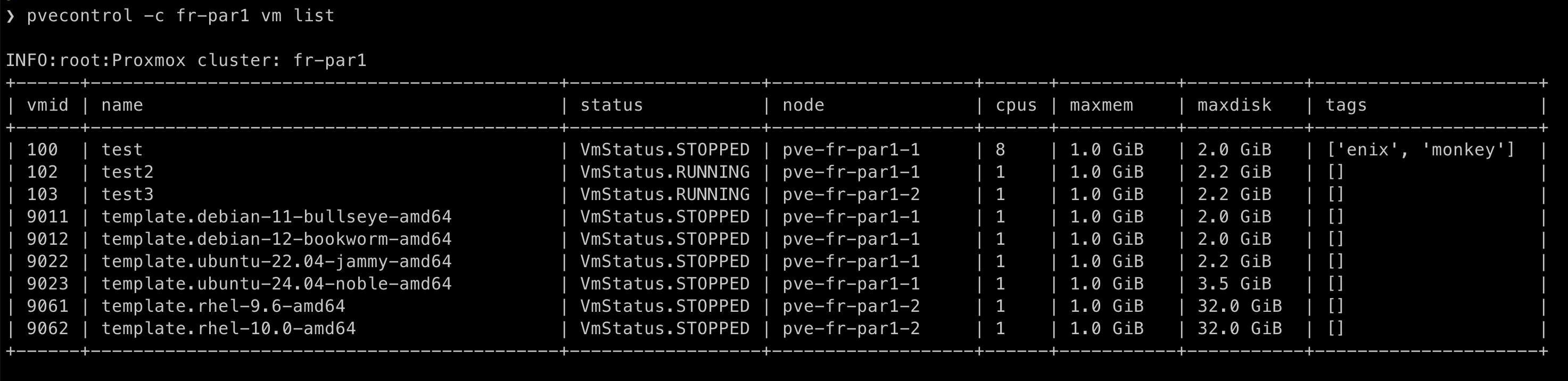
Multi-cluster VM listing: View the status and characteristics of all your VMs across your different clusters.
Smart hypervisor draining: Free up a hypervisor by moving VMs to other nodes based on CPU and RAM capacity and availability.
Sanity Check: Check the health of your Proxmox clusters before maintenance or detect anomalies, even in a high availability environment.
pvecontrol requires Python version 3.9 or higher and was developed for Proxmox version 8 and above.
Installation is straightforward with pip, and it is recommended to use pipx to automatically create a dedicated virtual environment:
pipx install pvecontrol
To use pvecontrol, you need to create a YAML configuration file in $HOME/.config/pvecontrol/config.yaml.
This file will list your clusters and authentication information. Here is an example configuration:
node:
  # Overcommit CPU factor
  # 1 = no overcommit
  cpufactor: 2.5
  # Memory to reserve for the system on a node (in bytes)
  memoryminimum: 8589934592
clusters:
  - name: fr-par1
    host: hostname.fr-par1
    user: pvecontrol@pve
    password: my.password.is.weak
    ssl_verify: true

  - name: fr-par-2
    host: hostname.fr-par-2
    user: $(echo $PVE_USER)
    password: $(echo $PVE_PASSWORD)
    ssl_verify: true
    node:
      cpufactor: 1
In the configuration shown above, you can see the use of shell commands.
This allows you to retrieve information using binaries, for example with a password manager.
The idea is to avoid storing a password directly on your computer.
Checking the status of a Proxmox cluster
Using pvecontrol is simple and intuitive. For example, to see a summary of the status of the fr-par1 cluster configured above:
pvecontrol -c fr-par1 status
INFO:root:Proxmox cluster: fr-par1

  Status: healthy
  VMs: 20
  Templates: 10
  Metrics:
    CPU: 0.02/64 (0.0%), allocated: 9
    Memory: 15.98 GiB/314.67 GiB(5.1%), allocated: 12.00 GiB
    Disk: 82.15 GiB/1.75 TiB(4.6%)
  Nodes:
    Offline: 0
    Online: 2
    Unknown: 0
Listing VMs in a Proxmox cluster
pvecontrol -c fr-par1 vm list
Hypervisor draining
To drain a specific hypervisor, use the command:
pvecontrol -c fr-par1 node evacuate pve-fr-par1-1

INFO:root:Proxmox cluster: fr-par1
Migrating VM 100 (test) from pve-fr-par1-1 to pve-fr-par1-2
Migrating VM 102 (test2) from pve-fr-par1-1 to pve-fr-par1-2
Confirm (yes):yes

Migrate VM: 101 / test-tag from pve-fr-par1-1 to pve-fr-par1-2
Migrate VM: 102 / test3 from pve-fr-par1-1 to pve-fr-par1-2
Sanity check of a Proxmox cluster
We have developed a series of tests based on our hosting and Proxmox cluster management experience. Their purpose is to ensure that our clusters are in a “healthy” state. To do so, simply run:
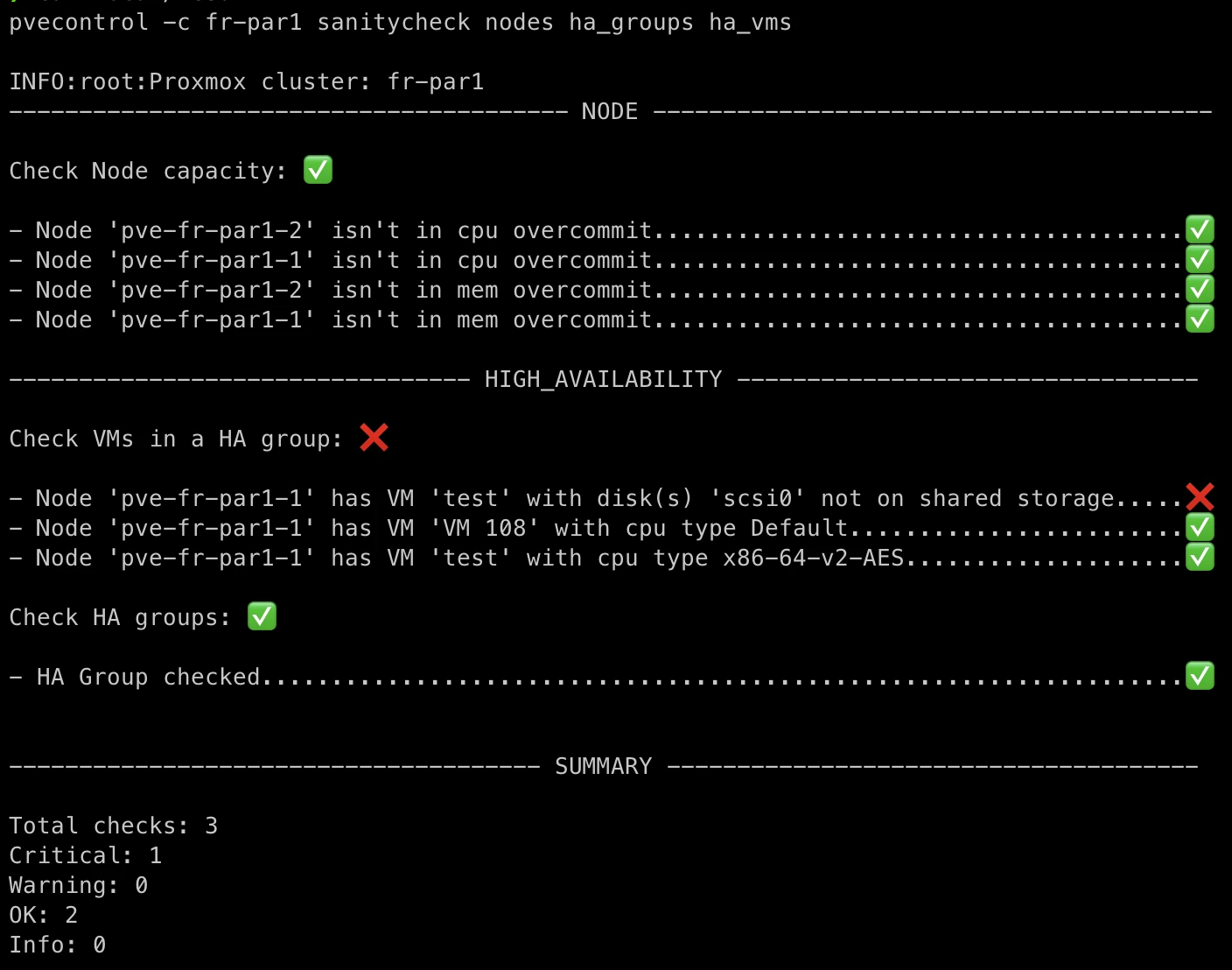
In the screenshot above, three tests are executed:
- Physical server load test (nodes): Verifies that the physical servers have sufficient resources.
- High availability configuration test (ha_groups): Verifies that the HA configuration is correct on the Proxmox cluster.
- VM high availability test (ha_vms): Verifies that the VM configuration (shared storage, CPU) is highly available if VMs need to be moved when one of the cluster’s physical servers is offline.
pvecontrol vs Proxmox Datacenter Manager
Proxmox Datacenter Manager was released at the end of 2024 to simplify Proxmox multi-cluster management. Since then, we make sure to only implement complementary features. Moreover, the approaches are different.
Proxmox Datacenter Manager requires installing a third-party server that connects to each cluster to provide a global management interface for all enrolled clusters. On the other hand, pvecontrol is simply a local CLI tool that requires no server. In addition, PDM does not allow, like PVEControl does, the execution of advanced tests with business-level checks.
If you want to learn more about PDM, you can read our article: We tested Proxmox Datacenter Manager!.
Roadmap
The features listed here are indicative and not exhaustive:
- Load balancer: Recommend VM distribution across the cluster’s hypervisors with an anti-affinity system;
- VM restore: Allow restoring a VM backup;
- Storage management: Update storage parameters for a PVE cluster;
- Disaster Recovery Management: Manage the restoration of entire architectures automatically via a PBS on a new Proxmox cluster.
We of course make sure to synchronize our developments with those carried out by the Proxmox teams.
Conclusion
The pvecontrol tool is the result of our operational experience and our specific needs in large-scale cluster management. We are delighted to share it with the Proxmox community and we hope it will help simplify your operations.
Feel free to share your feedback and suggestions directly on our Github project.
Do not miss our latest DevOps and Cloud Native blogposts! Follow Enix on Linkedin!